 Sigil
Request beta access
Sigil
Request beta access
Native RF analysis for macOS
Capture, analyze, and decode radio signals in one app.
Work from a live SDR or an IQ recording. Investigate unfamiliar signals, inspect their bits, and decode supported protocols in Sigil’s native Mac workspace.
macOS 14 or later. Currently an invitation-only beta.
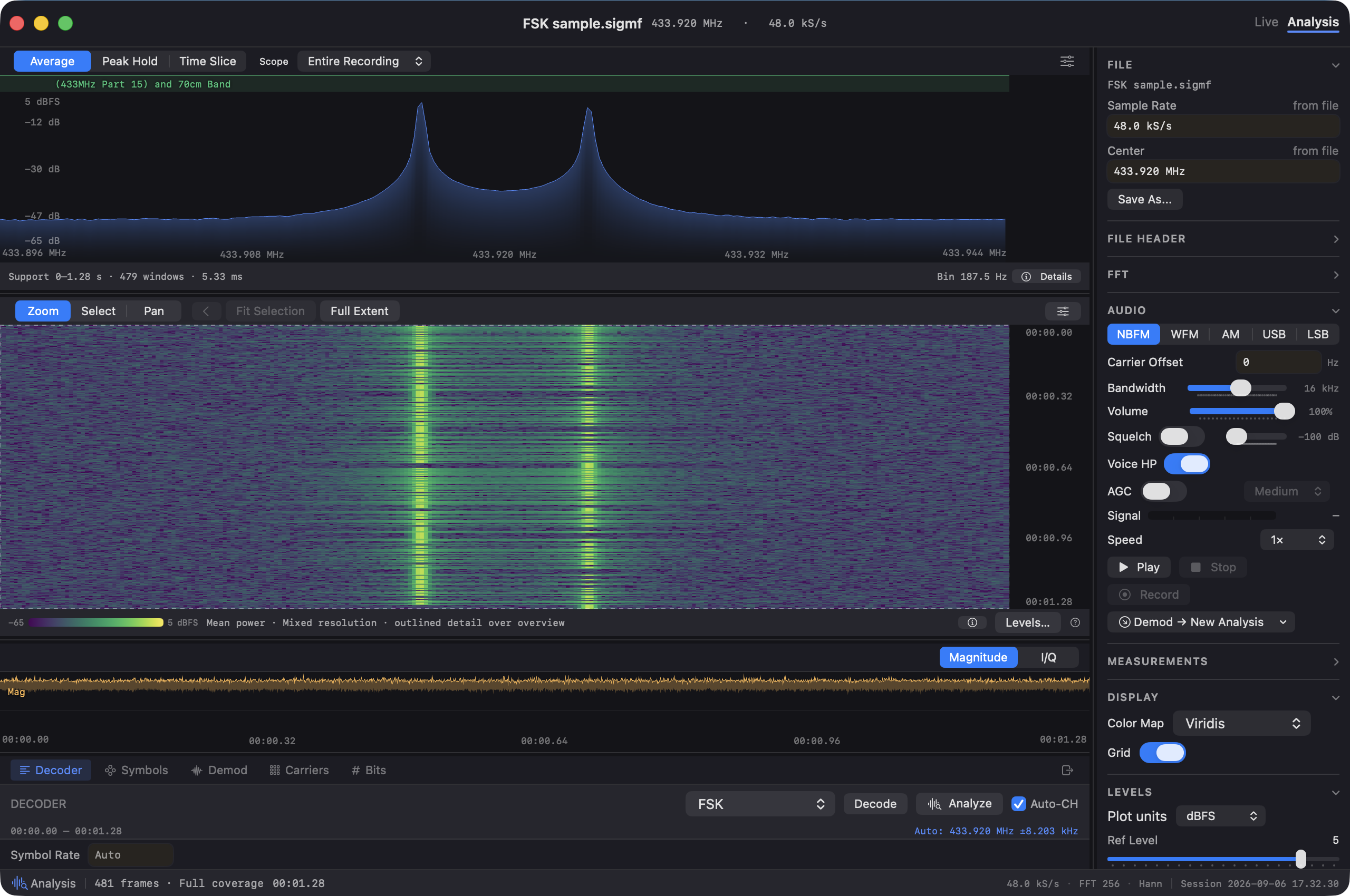
Generated 2-FSK sample in Sigil: the spectrum shows the two tones, with their changes over time in the waterfall below. 200 baud, ±4 kHz deviation; no radio hardware required.
View full-size imageThe analysis workflow
From a selected signal
to structured output.
Move from the spectrum to a closer look at the waveform, bits, and decoded output in the same workspace.
Know the protocol?
Select the signal and run its decoder. Inspect the results and export the output your decoder provides.
Explore the decodersInvestigating something unfamiliar?
Examine modulation, recover a bitstream, and work out the frame structure. Adjust the analysis as you learn more.
Explore the workbenches01 / Capture and select
Find the signal worth a closer look.
Explore a live receiver or open a recording. Select a signal in the spectrum and waterfall to focus your analysis.
Working with a selection
A generated sensor recording. The selected channel is centered at 433.9525 MHz; both transmissions remain visible.
Full app screenshot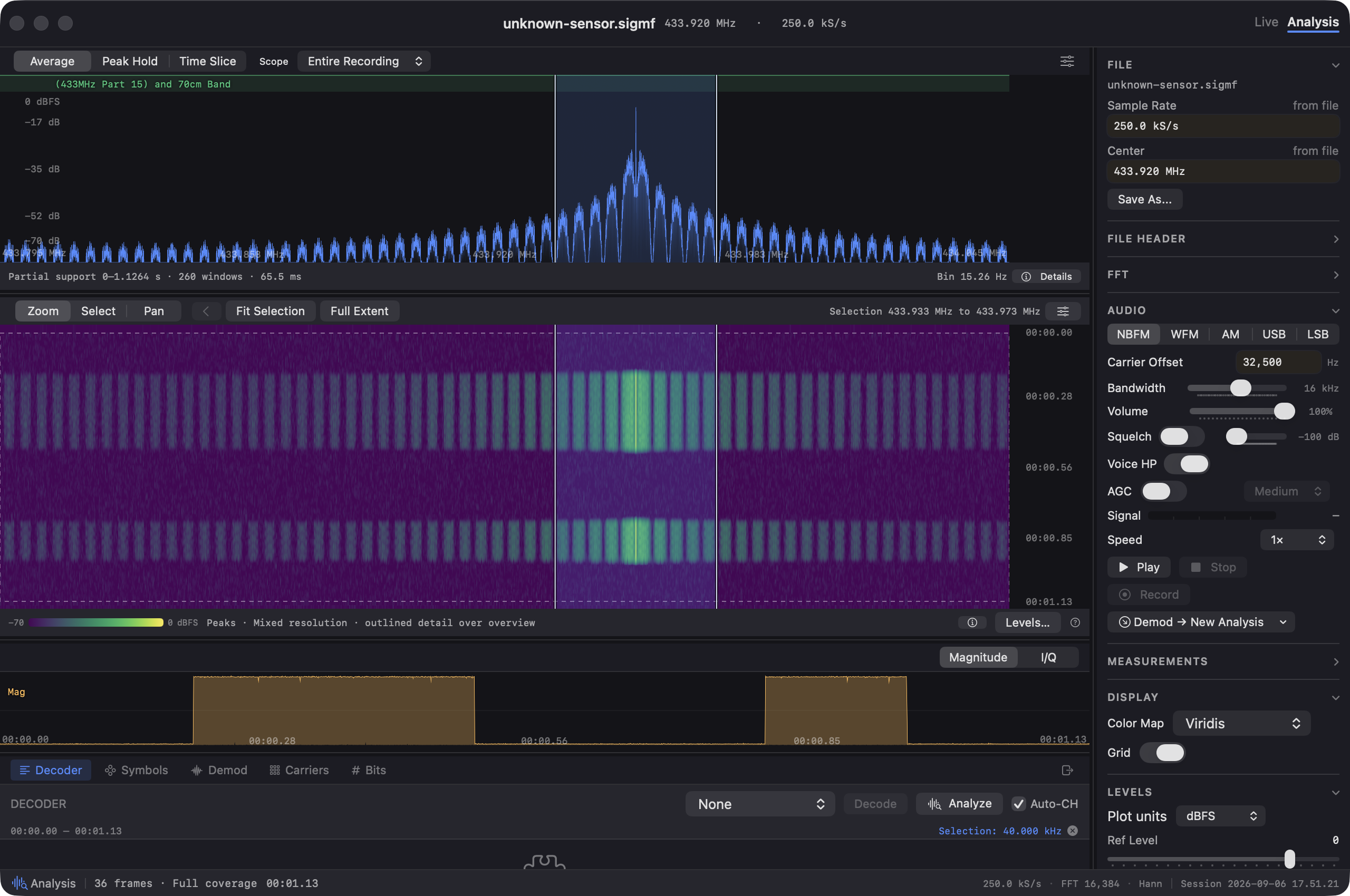
02 / Demodulate
Inspect the waveform. Recover the bits.
Investigate the modulation and symbol rate in the demodulation workbench. Adjust the settings and pass the recovered stream to Bits.
Analysis and decoding
The first burst, with OOK selected manually. Sigil estimates about 4,032 chips per second and recovers 1,159 chips for the Bits workbench.
Full app screenshot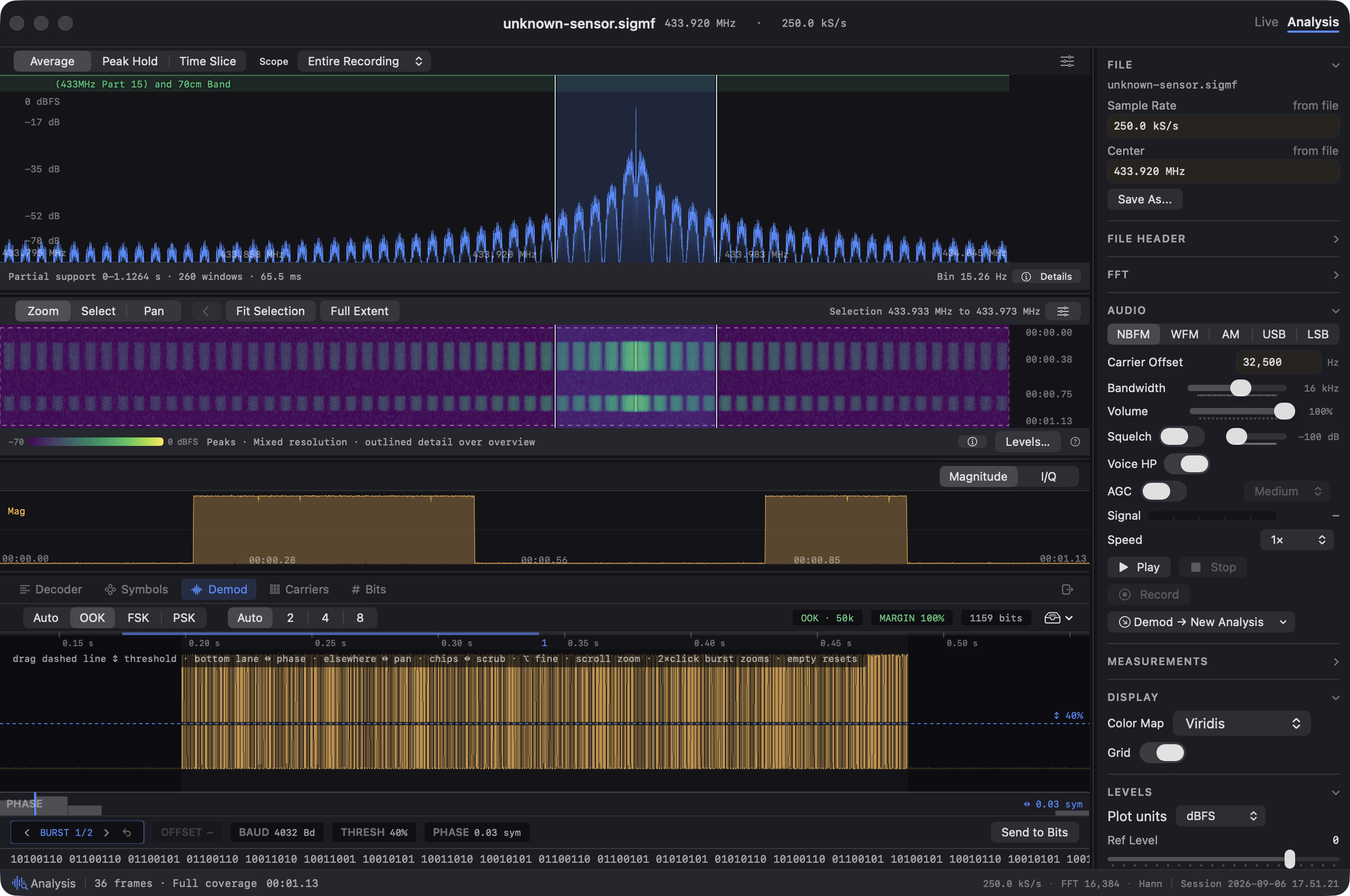
03 / Frame and interpret
Turn repeated bits into fields.
Compare frames, annotate fields, and investigate checksums. Give the recovered data a structure you can inspect. Save the interpretation as a protocol map and reuse it on matching bitstreams.

Manchester decoding reveals eight 72-bit frames. Field names and temperature scaling were entered using the generated sample’s known layout.
Full app screenshot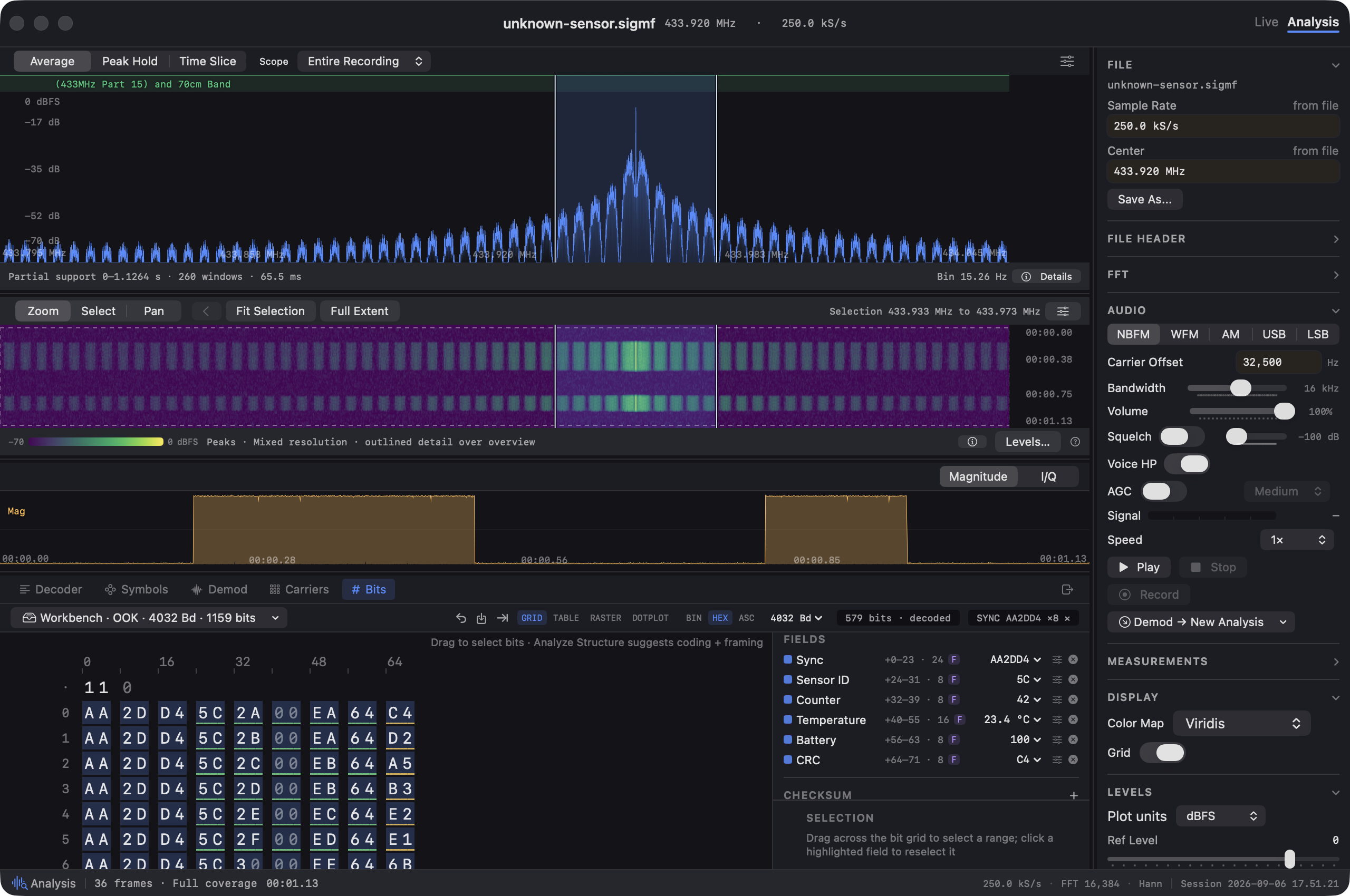
04 / Validate and export
Take the result into your next task.
Check the interpreted fields in a frame table and export them as CSV. For known protocols, run the corresponding decoder and export the output it provides.
Check output formats
All eight frames pass CRC-8/SMBUS over the selected payload fields. The exported CSV matches the sample’s counters and temperatures.
Full app screenshot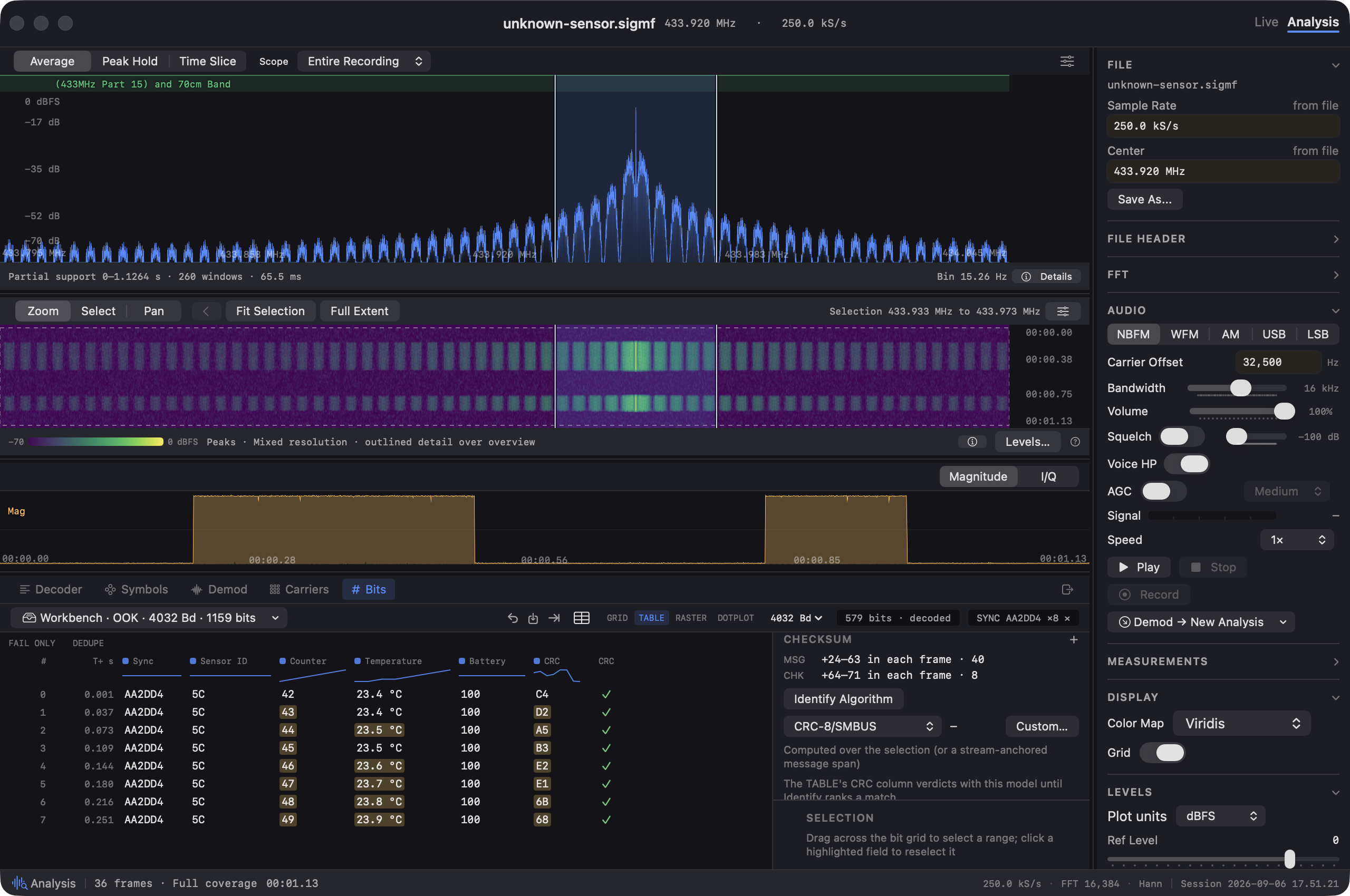
Why Mac?
Built for signal analysis on the Mac you already own.
Sigil was built to make radio signal analysis more accessible on the Mac. Apple’s M-series chips put powerful computing and integrated graphics into everyday laptops. Our aim is to bring that capability to signal exploration in a native macOS workspace, helping more people investigate radio signals with the Mac they already own.
Check your setup
Work from recordings
or a live receiver.
You need an SDR for live reception. You can analyze a recording without connecting any radio hardware.
Compatibility and specifications- Mac
- macOS 14 or later.
- Recordings
- SigMF, WAV, and raw IQ, with additional formats listed in the specifications.
- Receivers
- Drivers for RTL-SDR, HackRF, USRP, and more. Required libraries and device-specific details are on the Compatibility page.
Start from a recording
Your first result.
No radio needed.
Load the built-in sample and run the CW decoder to read “WELCOME TO SIGIL.” You can also open your own IQ recording and explore it in the same workspace.
Read the getting-started guideCommand-line tools
Keep going at the command line.
Analyze recordings and use structured output in your own scripts. The bundled CLI extends the workflow beyond the app window.
Analyze a recording as JSON
sigil analyze recording.sigmf --jsonReplace recording.sigmf with your own file.
One planned edition
The complete workflow.
A one-time purchase.
Planned: $39.99 USD one-time purchase.
Full 30-day trial at launch.
Sigil is currently in beta. The public trial and checkout are not available yet.
Pricing and availabilityAvailable by invitation
Bring your next signal to Sigil.
Tell us about your Mac, your SDR or recording format, and what you’d like to investigate.
Request beta access
Access is by invitation, with a named, expiring evaluation key. The public trial and checkout are not available yet.
Email a beta requestOpens your email app. You can also write directly to
support@sigil.radio
A request does not enroll you automatically. Participation is under the beta agreement.